Product Updates
Limit Orders: Trade at the Price You Choose
Limit Orders let you set the price you are willing to trade at. Your order fills at that price or better, or it does not fill at all.
September 1, 20263 min readUpdated September 1, 2026
Your Price. Your Trade.
Introducing Limit Orders. Set the price you're willing to trade at, and your order only executes at that price or better.
If the market doesn't get there, your order doesn't fill
A Limit Order gives you control over your price, not over the outcome. Trading involves significant risk and is not suitable for all investors. Prices change, and you can lose the full amount you put into a position. Read the Important Risk Disclosures before trading.
Speed or Price. Your Call.
| Order type | Priority | Effect |
|---|---|---|
| Market Order | Speed | You take the price on the screen right now. |
| Limit Order | Price | You wait for your number, or you don't trade at all. |
One gets your trade in fast. The other waits for your price.
Set a Limit Order in Seconds
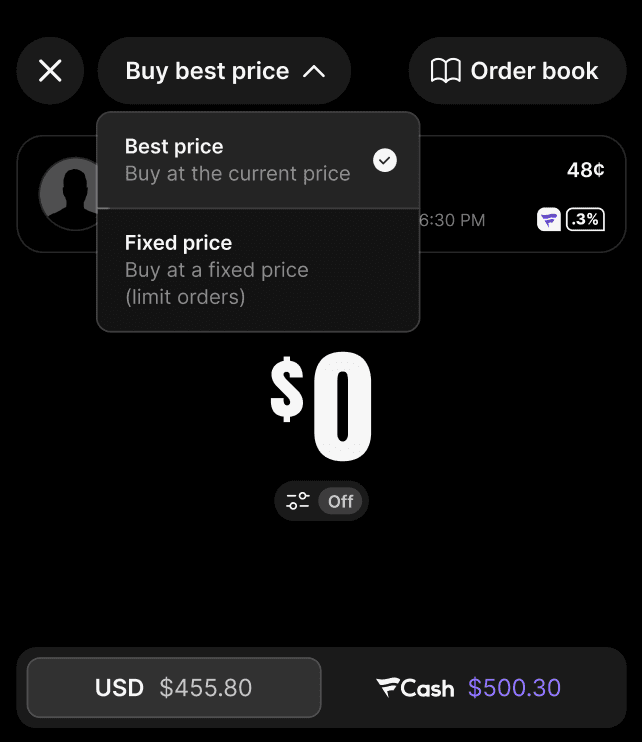
- Open any market.
- Switch your order type from Market to Limit.
- Set the price you're willing to pay.
- Confirm. Your order stays open until the market reaches your price or better.
You don't have to watch the charts. Set your limit and let the market come to you.
How It Looks
A contract is trading at 44¢ and you want it at 40¢. Set your limit at 40¢, and your order fills only if the market gets there.
Illustrative only
The example above is for illustration and is not a trade recommendation. Prices are subject to change.
Frequently Asked Questions
What happens if the market never reaches my price?
If your price isn't reached, the order stays open and does not execute. You can cancel it at any time before it fills.
Can I get a better price than my limit?
Yes. Your order executes at your limit price or better, never worse.
Do I have to sit and watch the market?
No. Once your limit is set, the order works in the background until the market reaches your price or you cancel it.
Can I cancel a Limit Order?
Yes. Open orders can be cancelled any time before they fill.
Which should I use, a Market Order or a Limit Order?
That's your call and it varies by user. Market Orders prioritize getting filled quickly, and Limit Orders prioritize your price.
Where do I find Limit Orders?
To trade limit orders, open any market and switch your order type from Market to Limit before you confirm.
Still need help?
Contact Support in the app and we'll get you to the right place.
Trade at your price
Download the Fanatics Markets app and set your first Limit Order.
Any trades or visuals of the services shown are illustrative, not trade recommendations, and prices are subject to change.
Concerned about your trading? Get specialized support from Birches Health nationwide. Visit bircheshealth.com/fanatics-markets, call (833) 483-3838 or email [email protected].
Related Articles
Product Updates
Fanatics Markets Product Update: October 2026
Fanatics Markets October 2026 product update: sub-penny pricing, 15-leg Combos, Multi View, event pages, and new basketball, baseball and esports markets.
10 min read
October 29, 2026
Product Updates